Buoyancy loads look simple on paper: hydrostatic pressure up, weight down, equilibrium reached. In FEA, however, buoyancy is one of the easiest ways to quietly invalidate a model—without obvious errors or warnings. Pressure on the wrong side of the hull, a misunderstood reference point, or an unconverged waterline can all produce results that look numerically sound but are physically wrong.
In this guide you’ll (1) set up buoyancy, (2) confirm convergence, (3) verify pressure direction and reference point.
What is a Buoyancy Load?
Buoyancy is required to model hydrostatic pressure and equilibrium of floating structures. It is the fundamental force that counteracts gravity, and a miscalculation can invalidate an entire structural analysis.
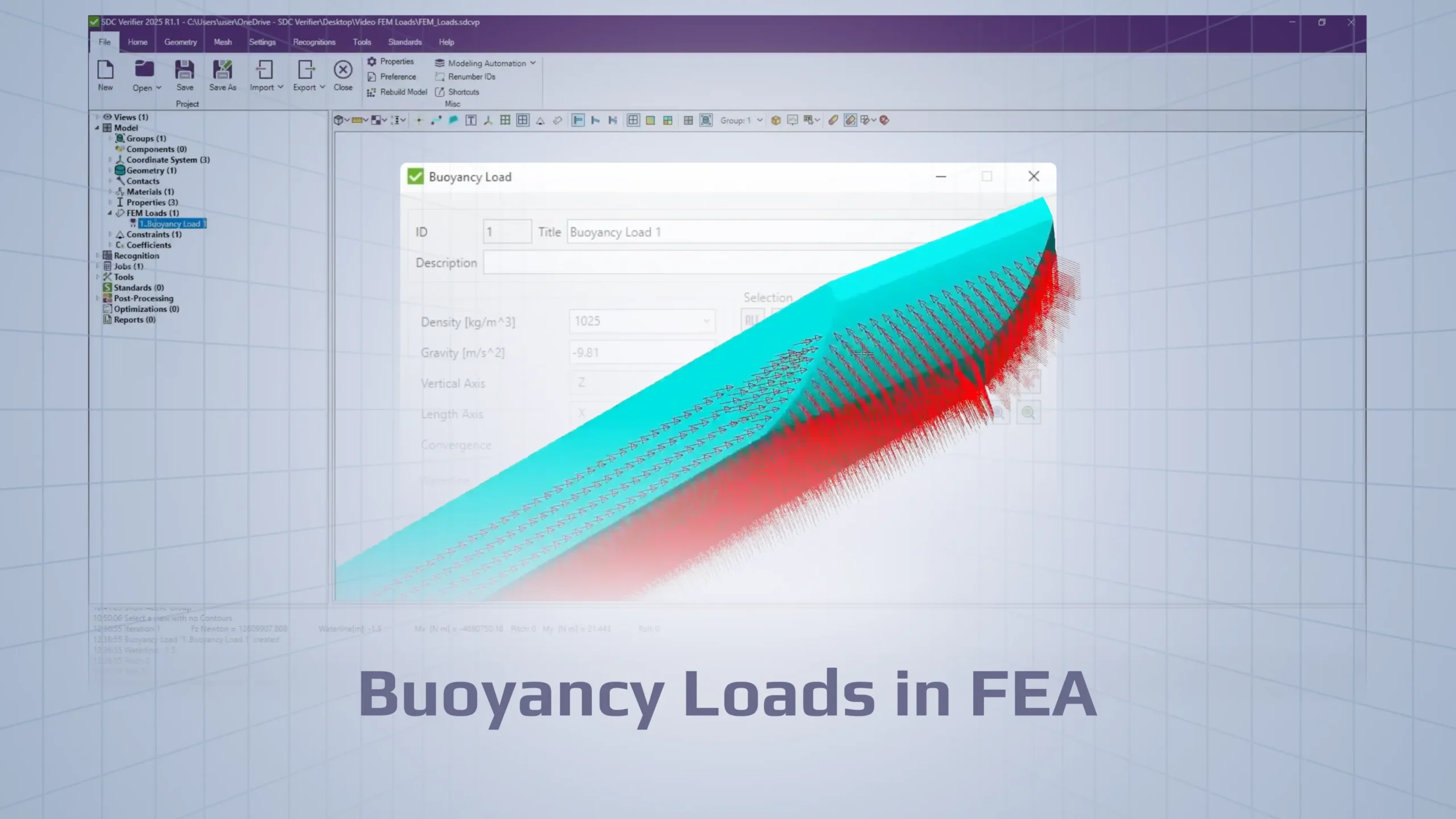
The Buoyancy Load feature creates a set of FEM loads composed of two primary components:
Pressure on plates: Hydrostatic pressure acting on the wetted surface of plate elements.
Force on beams: Buoyant forces acting on beam elements.
Beam elements receive buoyancy only when they represent submerged members, with buoyant forces still derived from the same waterline position, fluid density, and gravity.
The applied hydrostatic pressure is a function of three key physical factors: seawater density, gravity, and the depth below waterline (vertical coordinate relative to waterline). Beyond these static hydrostatic effects, the feature also allows for the inclusion of wave parameters, enabling the analysis of more dynamic marine conditions. (Wave adds wave-modified pressure; validate separately).
How SDC Verifier Calculates the Waterline
In marine structural analysis, a frequent challenge is determining the vessel’s floating position when the waterline is unknown. This position is defined by three unknowns: waterline (draft), pitch, and roll, which must jointly satisfy equilibrium conditions. Because the final floating state depends on both weight distribution and hull geometry, it cannot be determined analytically.
SDC Verifier addresses this by using an iterative equilibrium solver. The solver searches for a combination of waterline, pitch, and roll that satisfies, within a specified tolerance:
Vertical force balance between hydrostatic pressure forces and the structure’s weight
Moment balance about the relevant axes, ensuring rotational equilibrium.
In addition to the vertical force balance, the software also balances the moments acting on the structure to determine the final pitch and roll angles of the ship which ensures the vessel is not only floating at the correct depth but is also properly trimmed.
Axis definition (consistent with the UI):
Vertical Axis: defines up/down motion
Length Axis: longitudinal axis of the vessel
Roll: rotation about the Length Axis
Pitch: rotation about the width axis (perpendicular to the Length Axis in the horizontal plane)
This calculation is performed using the Newton-Raphson method. The software runs a series of iterations, adjusting the vessel’s position until the force and moment imbalances are within a user-defined numerical tolerance, where the user sees convergence (status/iterations) and what “converged” means in practice (residuals within tolerance) . When this balance is achieved, the solution is said to have converged, and the final FEM load set is created.
Basic Workflow for Applying a Buoyancy Load in SDC Verifier
Prerequisite: Ensure the model is meshed. Buoyancy loads are applied directly to plate element faces, which requires a finite element mesh with well-defined and consistent surface normals. The mesh therefore provides the geometric and directional basis needed to correctly compute hydrostatic pressure and resulting forces.
Image: Meshed model
Add Buoyancy Load: In the model tree, navigate to the “FEM Loads” section, right-click, and select “Add -> Buoyancy.”
Image: Added Buoyancy load
Define Parameters:
Predefined Mass method (mass value; if 0 → use model mass).
Predefined Waterline (global coordinates) method (waterline value; pitch/roll can be manual). (Use the names as in the tool.)
Set the necessary physical and numerical parameters in the dialog box:
◦ Fluid Properties: Define the Density of the water. Gravity has a default value.
◦ Model Axes: Define the Vertical Axis for the waterline and the ship’s longitudinal Length Axis. Roll is computed as rotation about the Length Axis, while pitch is computed as rotation about the width axis perpendicular to it.
◦ Calculation Method: Choose whether to calculate the waterline based on the model’s mass or to use a predefined waterline, mass, pitch, and roll. If the predefined mass option is used but the mass is set to 0, the model’s calculated mass will be used instead.
◦ Convergence: Set the accuracy tolerance for the iterative balancing calculation.
Select Hull Geometry: Select the hull plates (by Property, Group, or selection set).
Image: Selecting the hull
Preview and Confirm: Click the “Preview” button. Preview confirms what’s selected; pressure direction check comes after load is created.
Image: Preview of the model
Generate Load: Once all parameters are set and the selection is confirmed, press “OK” to create the FEM load.
Image: Applied FEM load
Following these steps correctly is the first half of the task; the second, more critical half involves verifying that the software has interpreted your inputs correctly.
✔ Pre-Check Checklist
□ Mesh is connected and the correct hull surfaces are selected
□ Vertical Axis and Length Axis are defined correctly
□ Solver has converged (force and moment tolerances satisfied)
□ Hydrostatic pressure is applied to the correct faces
(outside wetted surface; arrows point into the hull)
□ Reference point for moments, pitch, and roll is clearly understood
Essential Self-Check Steps
These are the critical checks that must be performed to ensure the buoyancy load has been applied correctly and that the results are physically meaningful:
1. Preview Your Selection: Before generating the load, always use the “Preview” function after selecting the hull geometry. It provides a clear visual confirmation that your selection criteria have correctly isolated the hull of the ship and have not inadvertently included internal structures or superstructure.
2. Check Reference Point: Confirm it’s located at center of hull in plan, at minimum vertical coordinate (per video), and explain it’s used for moment balance (pitch/roll).
3. Visualize the Applied Pressure: Pressure should act on the wetted hull faces and point toward the structure (not outward into water). Once the load is generated, select it in the model tree and use the “Preview” function to display the hydrostatic pressure vectors. You must visually inspect the model to confirm that the pressure has been applied to the outside of the hull and not the inside. An incorrect application will produce completely invalid results.
4. Check for Mesh-Related Errors: The software’s ability to automatically recognize which element faces to apply pressure to depends on a “perfectly connected mesh.” If you observe pressure applied incorrectly (e.g., on the inside of the hull), the root cause is likely an imperfection in the mesh, such as a disconnected hull surface, non-watertight topology, inconsistent face normals that lead to the wrong face
5.If pressure is on the wrong side: Fix faces and re-check. If the pressure preview shows vectors on the inside of the hull (instead of the outside), update faces for the affected elements and run Preview again to confirm the direction. This issue typically indicates the mesh is not perfectly connected, which prevents reliable face recognition.
6. Check convergence: Confirm the tool reports convergence within tolerance; if not converged, do not trust pressure field.
Common Mistakes and Where Setups Go Wrong
Avoiding these common pitfalls is key to a successful analysis:
Ignoring Mesh Quality: The most common error is assuming the software will correctly apply pressure to any mesh. A “perfectly connected mesh” is required for reliable automatic face recognition but failing to ensure mesh continuity can lead to pressure being applied to the wrong side of the elements. If the hull surface isn’t closed/connected, the tool may treat inside/outside incorrectly → pressure flips locally.
Skipping the Preview Step: Rushing through the setup and creating the load without first previewing the selected hull faces is a significant risk. It can easily lead to the load being applied to the wrong parts of the model or missing sections of the hull entirely.
Failing to Verify Pressure Direction: After creating the load, you need to preview the pressure vectors. Neglecting to check whether the pressure is applied to the correct side of the hull elements (i.e., the external wetted surface) is a critical oversight, especially on complex hull geometries. Add: pressure should not appear on internal compartments / decks / superstructure; only wetted hull.
Misinterpreting Axis Definitions: Incorrectly defining the Vertical Axis or Length Axis will cause the software to calculate the waterline, pitch, and roll incorrectly, leading to an erroneous equilibrium position that fails to represent the true physical balance of forces and moments discussed earlier. Add: symptom = waterline tilts wrong way / roll and pitch swapped / unrealistic trim.
Misunderstanding the Reference Point: Reference point is used to compute moments for equilibrium; wrong assumption about it → misreading pitch/roll results (even if the solver converged).
By being mindful of these common issues, you can significantly improve the accuracy and reliability of marine structural analyses.
Conclusion
Buoyancy modeling requires pressure, forces, moments, and reference geometry to be physically consistent. SDC Verifier software automates waterline and equilibrium calculations, but engineering judgment remains essential.
Most buoyancy errors are easy to prevent: wrong face selection, pressure applied to the inside of the hull, incorrect axis definitions, or misunderstood reference points. These issues can be caught early by previewing selections, inspecting pressure direction, and verifying convergence and moment logic.