Finite Element Analysis (FEA) is a numerical method engineers use toapproximatehow a part or structure behaves under loads, temperature, vibration, etc. The idea is simple: replace a continuous body with a mesh of small “elements,” solve the governing equations on that mesh, and interpret the results.
Join our newsletter
Stay updated with the latest in structural verification, engineering insights, and SDC Verifier updates.
Please enter a valid email address.
What is Finite Element Analysis (FEA)?
Finite Element Analysis (FEA)is a computational technique that predicts field quantities (stress, strain, displacement, temperature, pressure, …) by:
discretizinga geometry into many small elements connected at nodes,
approximating the solution inside each element using shape functions,
assembling and solving a global system of equations for the unknowns (typically nodal displacements or temperatures).
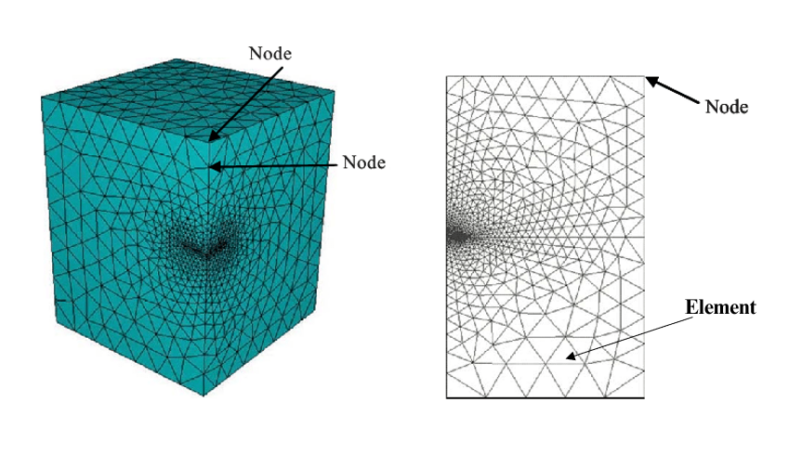
An FEA model is a mesh: elements connected at nodes. Finer mesh is used where gradients are high.
Figure — Finite element mesh: elements connected at nodes; local refinement increases resolution in critical regions. Source: researchgate.net
The result is anapproximation, not a “perfect answer.” Accuracy depends on assumptions, boundary conditions, element choice, and mesh quality.
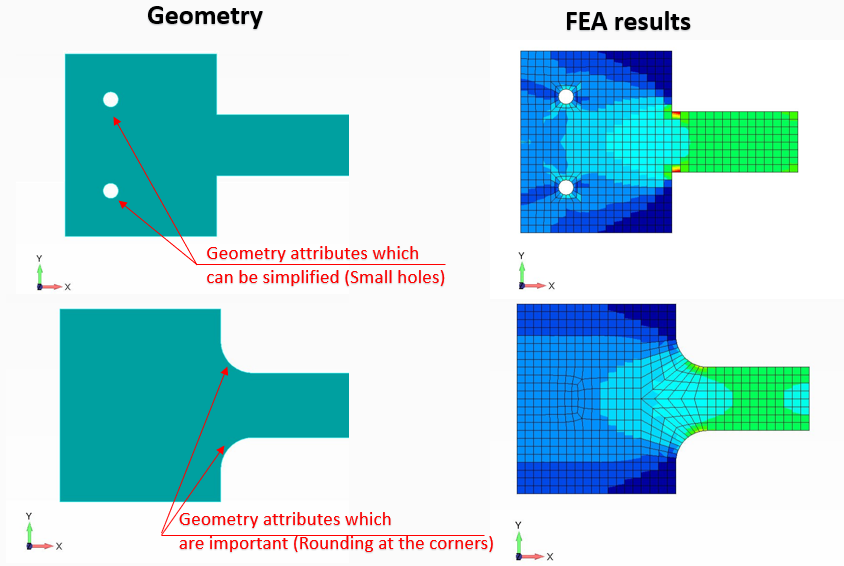
FEA accuracy often depends more on what geometry you keep/simplify than on solver settings. Remove features that don’t affect the load path, but keep stress raisers.
Figure — Geometry idealization in FEA: small features can often be simplified, but fillets/notches that drive stress concentrations should be modeled.
3) Mesh the geometry
Meshing sets the “resolution” of the approximation.
Smaller elements generally improve accuracy (up to a point), but increase solve time.
The mesh must befine where gradients are high(stress concentrations, contacts, sharp geometry changes).
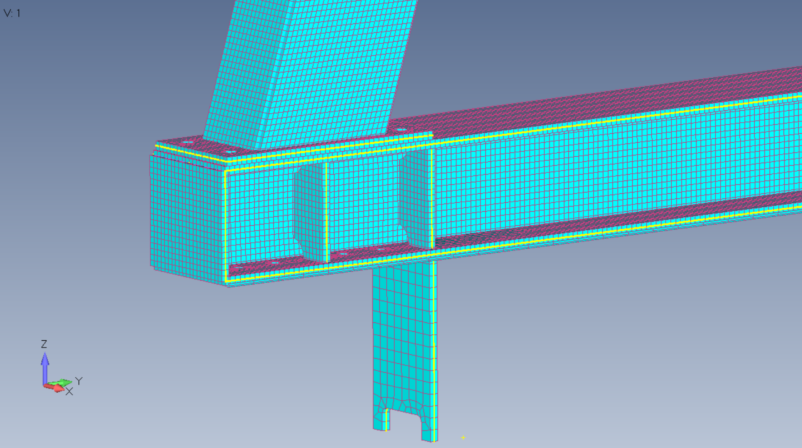
Real models rarely have a uniform mesh: connections and load-introduction regions typically need finer elements to capture stress gradients.
Figure — Example of a 3D solid-element mesh for a structural connection, with local refinement around the joint region.
whereKis the global stiffness matrix,uare unknown nodal displacements, andfis the load vector.
For nonlinear problems (plasticity, large deformation, contact), the solver iterates to satisfy equilibrium.
5) Post-process + verify
Post-processing turns raw results into decisions:
plots of displacement/stress/strain/temperature
reactions and load paths
utilization/allowables
Verification is where most “bad FEA” gets caught.
The inputs that usually decide whether results are right or wrong
Boundary conditions (BCs)
BC mistakes are the #1 reason for nonsense results.
Over-constrained models look artificially stiff.
Under-constrained models drift (rigid body motion).
“Fixed” boundaries are rarely truly fixed in reality.
Loads
Apply loads in a way that matches the physical load path.
Watch out for point loads on shells/solids (often need distribution).
Material model
Linear elastic is fine for many stiffness/stress checks, but not for yielding, crushing, hyperelastic materials, etc.
Contacts and connections
Bonded vs frictionless vs frictional contact changes the structure.
Bolts/welds/adhesives: model them explicitly or use an equivalent representation — but be consistent.
Element type choice
Beams: great for slender members and global response.
Shells: best for thin plates/shell structures (and often the right default in structural work).
Solids: needed when through-thickness stress or complex 3D states matter.
Mesh convergence: the one test you can’t skip
If you refine the mesh and your key outputs keep changing, you don’t have an answer yet.
A practical approach:
pick 1–3 key outputs (e.g., max displacement at a point, average stress in a section away from a notch, reaction force),
refine the mesh in the critical region,
check whether the outputs stabilize.
Important:peak stress at a sharp corner can diverge with refinement (a mathematical singularity). In that case you need a different metric (averaged stress, hotspot stress, structural stress, stress linearization, or a model change).
Pre/post: SDC Verifier, Femap, HyperMesh/HyperView, Simcenter 3D, ANSYS tools, etc.
Where SDC Verifier fits
SDC Verifier can be used as astandalone environmentwhere you can run analysis and verification in one place. In this mode, SDC includes abuilt-in Nastran solverand then adds a verification layer on top of the solved results.
What you get:
a single workflow from model → solve → results → checks
repeatable, standards-based structural verification (not just plots)
traceable reports that capture inputs, assumptions, and calculations
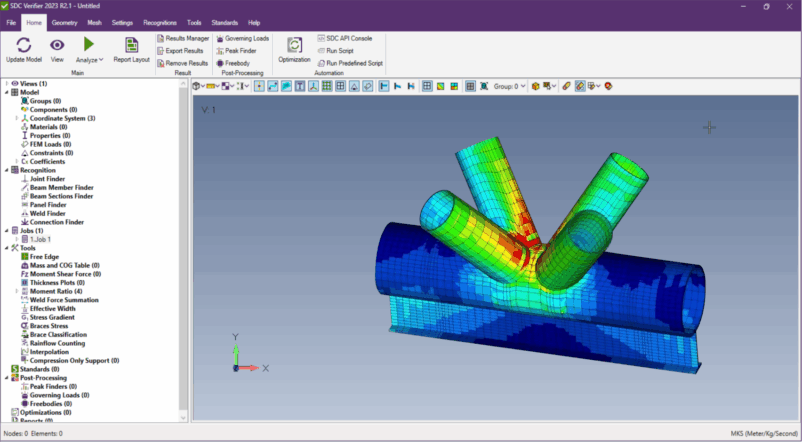
Example: a typical post-processing view in SDC Verifier — solved FEA results on a joint model, ready for verification and reporting.
Figure — SDC Verifier post-processing view: contour plot on a tubular joint model based on solved FEA results.
SDC reads the model + results and runsverification, checks, and reporting
Why teams use add-ons:
keep their existing solver/toolchain
standardize verification across projects and iterations
avoid rebuilding models just to run checks
What SDC Verifier is (in both modes)
a verification layer that turns FEA models/results intorepeatable structural checks
a way to reuse setups across load cases and design changes
What it isn’t
a replacement for engineering judgment (loads, BCs, and material assumptions still decide correctness)
Watch the workflow end-to-end
This webinar shows what an optimized FEA workflow looks like when you keep modeling, solving, standards checks, and reporting in one loop. It’s a practical walkthrough aimed at engineers who spend more time on verification + reporting than on the solve itself. If you only want the “how it works” parts, jump to the chapters below.
Optimizing FEA Workflows – Integrated Software Solutions for Standards-Driven Design (Webinar, 7 Nov 2024 · 52 min)
FEA examples (what it’s used for)
Structural strength: stresses/strains, utilization vs allowables.
Stability: buckling screening and nonlinear collapse.
Dynamics: vibration and shock response.
Thermal: temperatures and thermal stresses.
Design iteration: compare variants quickly before prototyping.
Design iteration: compare variants quickly before prototyping
Where FEA is applied: industry examples
Offshore and marine structures— wave and wind loads are translated into global FEA models of jackets, topsides, and hull structures. Classification rules (DNV, Bureau Veritas, Lloyd’s) require documented stress checks on plates, stiffeners, and welds across multiple load cases. The sheer number of structural members makes manual post-processing impractical — this is the primary domain where automated code-checking tools like SDC Verifier are used.
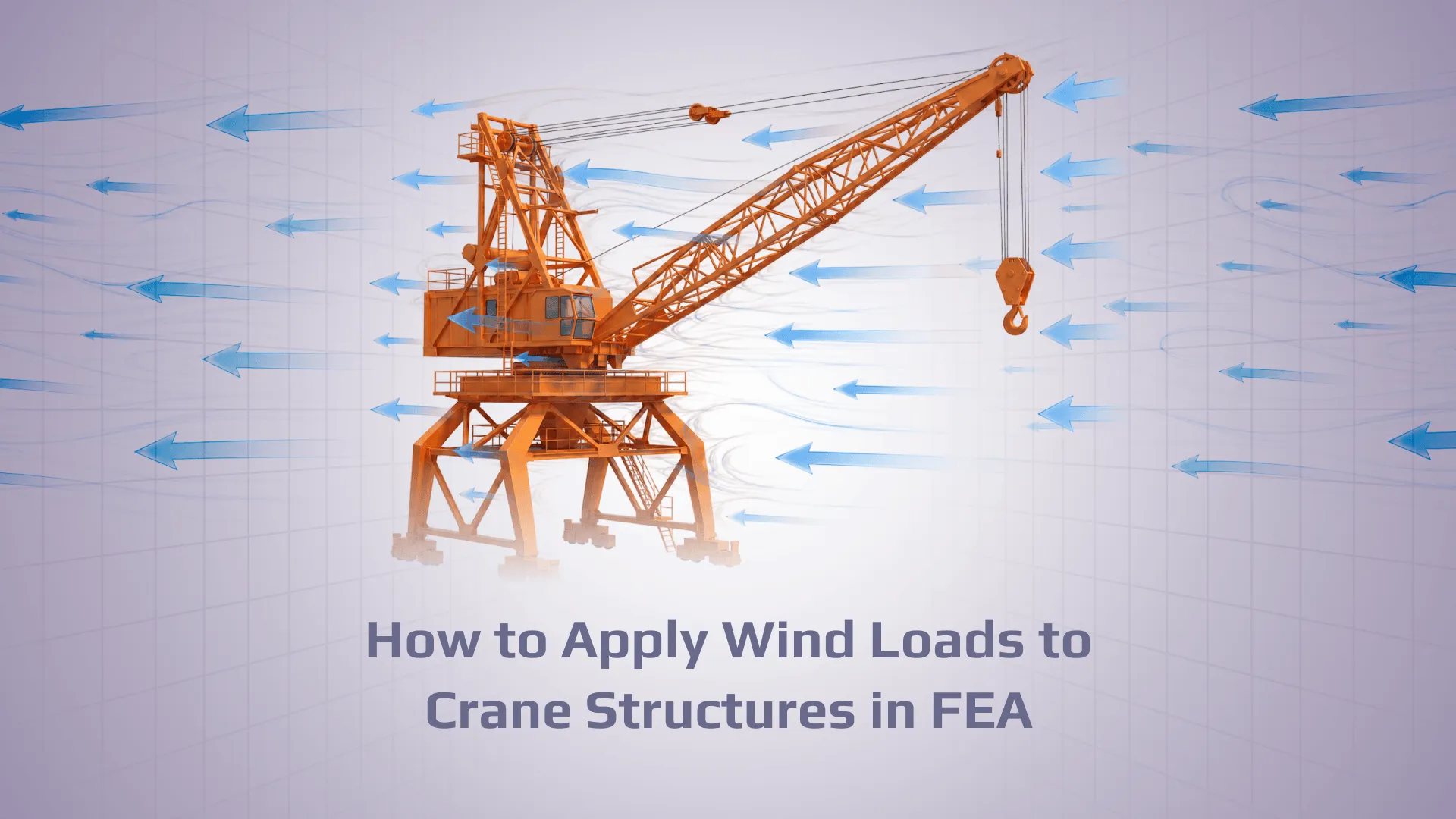
Cranes and lifting equipment— FEA is used to verify structural members against EN 13001, FEM 1.001, or AS 4991. The challenge is that a large crane model can have thousands of beams and plates, each needing utilization checks across dozens of load combinations. Automated structural member recognition and code checking compress what would be weeks of manual work into hours.
Aerospace— every primary structure (wing spar, fuselage frame, landing gear) must be analytically justified before it flies. FEA models are typically large, tightly controlled, and tied directly to certification evidence. The Nastran solver dominates; pre/post-processors like Femap and Patran are standard.
Automotive— crashworthiness (frontal, side, rear impact), NVH (noise, vibration, harshness), and fatigue durability are the three main FEA workstreams. Crash uses explicit dynamics (LS-DYNA, Radioss); NVH and fatigue use implicit structural solvers. The same body-in-white model may be used for all three with different load cases and solver settings.
Civil and structural engineering— bridges, buildings, and foundations use FEA when geometry or load conditions are too complex for code-formula methods. Seismic response, progressive collapse, and long-span bridge dynamics are the cases where FEA is most often required rather than optional.
Pressure vessels and process equipment— ASME VIII Div. 2 and EN 13445 explicitly permit FEA-based design by analysis as an alternative to the standard design-by-formula approach. This allows thinner walls and lighter structures, provided the FEA is properly documented and verified.
Join our newsletter
Stay updated with the latest in structural verification, engineering insights, and SDC Verifier updates.
Please enter a valid email address.
FAQ
What does FEA stand for?
FEAstands forFinite Element Analysis.
What is FEA analysis?
In everyday engineering language, “FEA analysis” usually just meansrunning an FEA model and interpreting the results. Strictly speaking it’s redundant (A = analysis), but it’s common usage.
What is finite element analysis used for?
To predict how a component or structure responds to physics (loads, temperature, vibration, etc.) when analytical formulas are too simplified or the geometry is too complex.
Is FEA accurate?
It can be very accuratefor the question it was built to answer— but only if modeling assumptions are reasonable and the solution is verified (especially mesh convergence and boundary conditions).
Why do FEA results sometimes look “wrong”?
Most often: bad boundary conditions, wrong units/materials, contact assumptions, or over‑interpreting local peak stresses near singularities.
What’s the difference between FEA and CFD?
FEA is often used for structural/thermal problems;CFDfocuses on fluid flow. Many real projects couple them (e.g., pressure from CFD becomes loading for FEA).
What is FEA used for in industry?
Primarily: verifying that a design won’t fail under its intended loads before it’s built. In practice that means stress and fatigue checks for structural components, buckling assessment for thin-walled structures, thermal stress analysis for parts that see temperature gradients, and vibration/resonance screening for anything that moves or is attached to something that does.
Do I need 3D solids to do “real” FEA?
Not always. Shell or beam models can be more correct (and faster) when thickness is small compared to other dimensions and the question is global response.