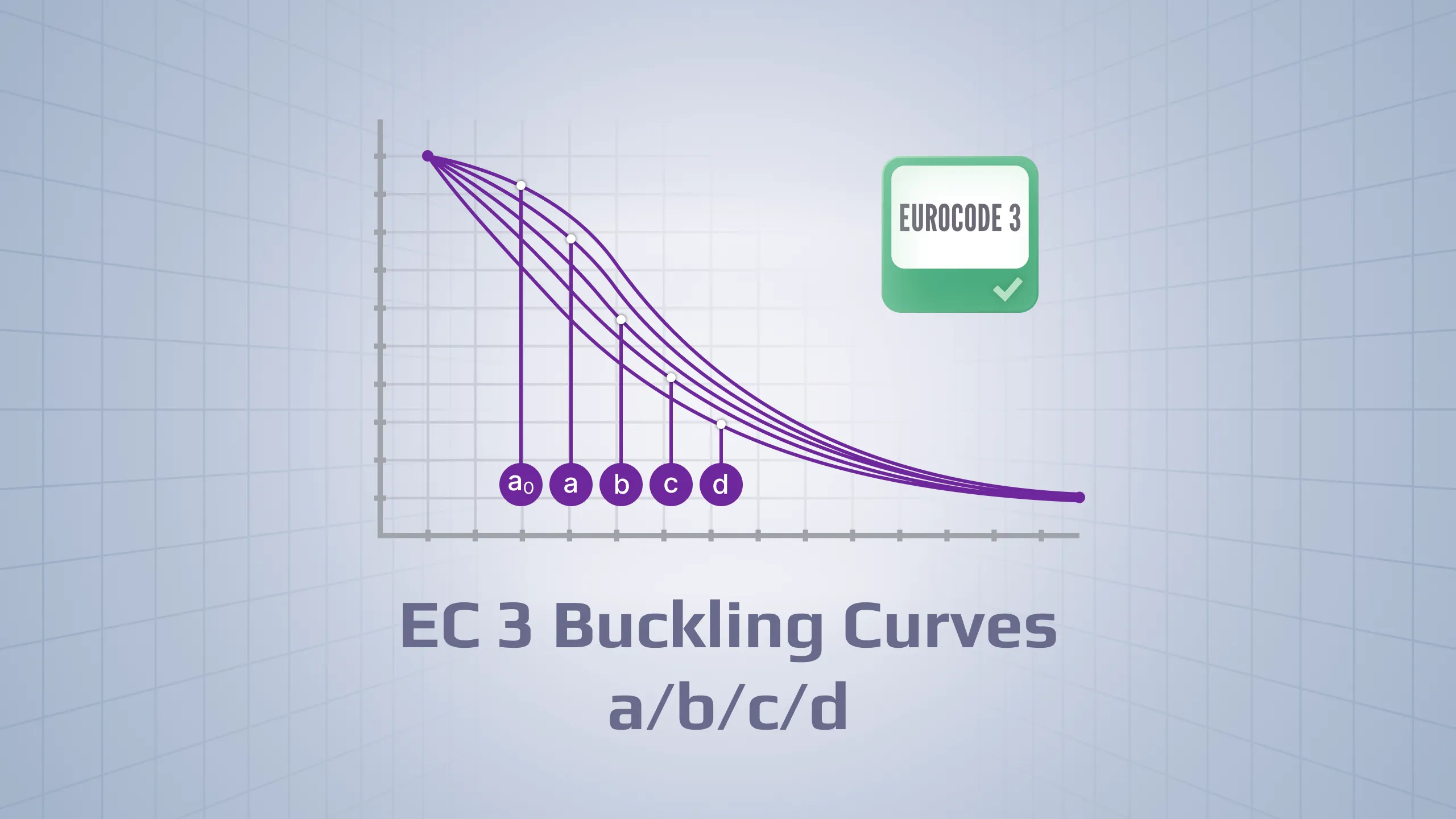
Where it applies: AS 4100:2020 fatigue (Section 11) covers steel bridges, cranes, frames, CHS/RHS trusses and jackets under many stress cycles.
Method in short: You classify details (Table 11.5.1), apply βᵗᶠ and φ, check exceptions, then use S–N curves to convert stress ranges into allowable cycles and damage.
What SDC Verifier does: You provide material data, element thickness, detail category, weld type, φ and load groups; SDC Verifier handles stress ranges, exceptions, rainflow and damage summation per detail.
Trust level: A jacket benchmark shows SDC Verifier reproduces AS 4100 fatigue hand calculations 1:1 (total damage ≈ 3.22 → fail).
AS 4100:2020 treats fatigue in a very specific way: it assumes you know the stress ranges in your details, you classify those details using sketches and tables, and then you calculate allowable cycles and damage from S–N curves in Section 11.
That’s manageable for a single welded joint in a spreadsheet. It is not manageable for a full FEA model with thousands of welds, CHS joints, and load groups.
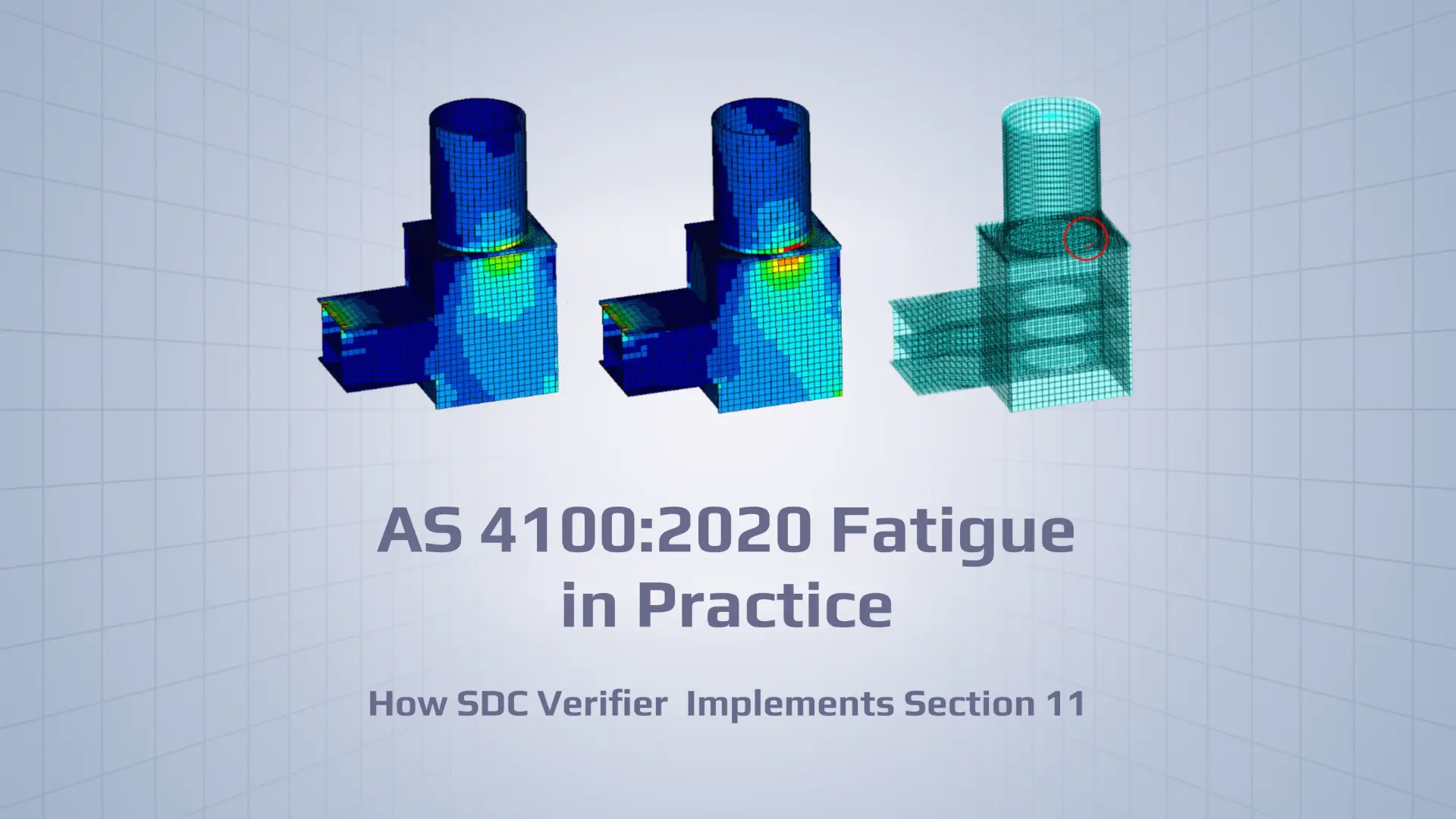
This article explains how AS 4100:2020 fatigue is implemented in SDC Verifier, so you can understand exactly what the software is checking, how it maps to the code, and what the results actually mean.
Try AS 4100 Fatigue on Your Own Model
Run the AS 4100:2020 fatigue check directly inside your FEA model. Download SDC Verifier, import your structure, and see clause-based fatigue damage for every critical detail.
AS 4100 fatigue provisions are meant for steel structures where the same details see many cycles of stress range over their life. That includes things like:
bridge members carrying traffic,
crane runway beams and frames under repeated lifting,
In all those cases, the governing detail is usually not the one with the highest static stress, but the one that sits in the middle of millions of cycles with a moderate stress range. Section 11 gives the design rules for that situation: how to classify the detail, how to get a design stress range, when you can skip further checks, and how to compute fatigue damage when you cannot.
SDC Verifier takes that logic and runs it automatically on your FEA results. You still have to make engineering choices – detail categories, capacity factor, which stresses to use – but you don’t have to push every equation through Excel.
Section 11: Method in Short
Section 11 is an S–N based method as defined in AS 4100:2020 – Steel structureswith a few gates you must pass before you even talk about fatigue damage.
First, the code checks applicability:
thickness must be at least 3 mm and yield stress not greater than 690 MPa (Section 1 / 1.1.2),
maximum stress in any cycle must not exceed the yield stress,
stress range must not exceed 1.5 times the yield stress (Section 11 / 11.1.3).
If these are violated, you are outside the intended range of the method.
Second, you classify the detail using Table 11.5.1:
non-welded details (Group 1),
welded details not in hollow sections (Group 2),
bolts (Group 3),
welded details in hollow sections (Group 4).
Each category corresponds to an S–N curve. For normal stress, curves are given in Figure 11.6.1; for shear stress, in Figure 11.6.2. Shear stress fatigue is limited to categories 80 and 100.
For some welded details, the fatigue strength is adjusted for thickness using a factor βtf from Section 11 / 11.1.6. This effectively penalises thick plates and welds.
On top of that you have the capacity factor φ from Section 11 / 11.1.5 In the reference design case φ = 1.0. For non-redundant load paths, φ must be reduced (down to 0.7 or less). φ appears both in the exception checks and in the expressions for allowable cycles.
Finally, Section 11 defines:
exceptions where no further fatigue assessment is required (11.4 and 11.7),
and, when those do not apply, the full variable stress range check (11.8.2), where allowable cycles are calculated from the S–N curves and compared with the number of cycles you expect.
SDC Verifier follows this order. The software is not inventing a different method; it is implementing the same gates and equations that you would apply manually.
Preparing the FEA Model for AS 4100 Fatigue
The fatigue check is only as good as the model and inputs you give it. In practice, you need four things in place.
Material data
For every material used in the model, yield and tensile strengths must be defined. The AS 4100 fatigue wizard checks this. If yield stress is missing, the implementation cannot verify basic conditions (1.1.2 and 11.1.3), and you will not get reliable results.
Beam lengths
According to the standard’s calculation procedure, beam length in Y and Z directions is required. SDC Verifier uses data from the Beam Member Finder automatically. If beam members have not been recognised, you should run Beam Member Finder before you run the fatigue check.
If Beam Member Finder is not used and the model relies heavily on beams, expect problems in any calculation that assumes a member length.
Loads and load groups
Fatigue checks depend on two things:
the stress ranges,
and the number of cycles in each range.
In SDC Verifier, stress ranges come from your load cases, load combinations, and load groups. A typical setup for fatigue might be:
several base load cases (dead load, live load, wind, temperature, etc.),
overall load groups that combine them into realistic “cycle blocks” (e.g., crane operating cycle, traffic pattern, wind condition),
number of cycles assigned per load group.
You should think about these groups the same way you would for hand calculations; the software does not know what your “one million cycles” actually represent unless you tell it.
SDC Verifier can use all three. Which one is appropriate depends on how closely your geometry matches the standard’s detail sketches. For regular plate details and simple welds, nominal stresses are usually fine. For complex weld geometries and tubular joints, hot spot stress is often more realistic.
Setting Up AS 4100 Fatigue (2020) in SDC Verifier
The standard is added from the ribbon:
Standards → Main → AS → AS 4100 Fatigue (2020)
Custom settings are accessed via:
AS 4100 Fatigue (2020) → Help
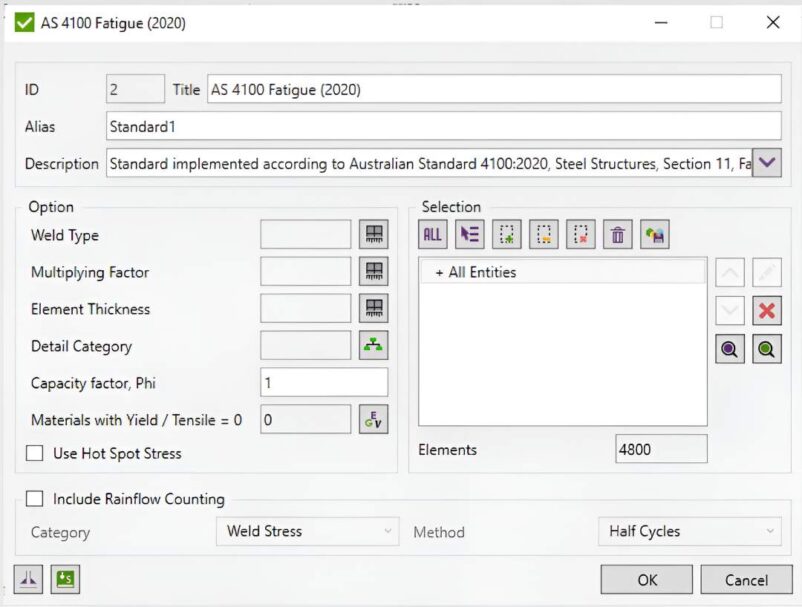
This opens the configuration window for the check. The main inputs correspond directly to the code.
Figure 1 – AS 4100 Fatigue (2020) settings window in SDC Verifier (weld type, detail category, φ, hot-spot stress and rainflow options).
Detail category
“Detail category” is the classification from Table 11.5.1, first column. You assign it to each relevant structural member, connection, or detail.
For normal stress, any category in the table can be used. For shear stress, only categories 80 and 100 are valid, which matches the standard.
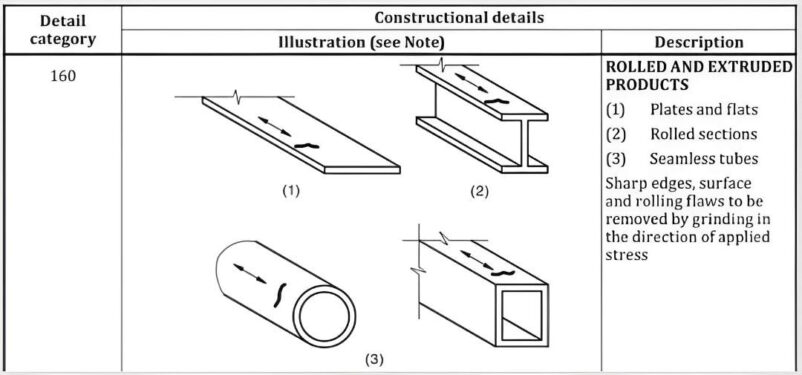
Figure 2 – Example AS 4100 detail category 160: rolled and extruded products (plates, rolled sections, seamless tubes) with the direction of applied stress.
Once you choose a category, SDC Verifier:
links it to the appropriate S–N curve from Figure 11.6.1 (normal) or Figure 11.6.2 (shear),
applies thickness correction βtf where required,
and uses the resulting parameters in the allowable cycles equations from Section 11 / 11.8.2.
Groups (1–4) are not inputs, they just organise the categories. The software cares about the actual category number.
Element thickness
“Element thickness” is an elemental characteristic.
For plate elements, leaving it at zero tells SDC Verifier to use the thickness recognised by the plate recognition tool. For non-plate elements, you specify a thickness manually.
Element thickness is used twice:
to check the basic requirement t ≥ 3 mm from Section 1 / 1.1.2,
and to compute βtf for certain weld details in Section 11 / 11.1.6.
If thickness is wrong or missing, βtf will be wrong, and the fatigue capacity will no longer match the standard.
Weld type
“Weld type” distinguishes between:
transverse fillet or butt welds,
and other weld types.
This flag decides how βtf is calculated. For transverse fillet and butt welds, Section 11 / 11.1.6 allows a particular thickness correction rule.
In the implementation, weld type does not change the stress itself; it changes how strongly thickness penalises the fatigue strength for that detail.
Multiplying factor for truss connections
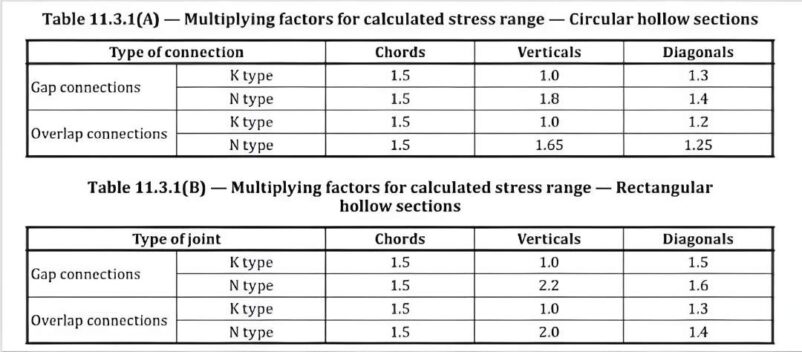
For truss connections involving circular or rectangular hollow sections, the standard uses multiplying factors from Tables 11.3.1(A) and (B) to adjust stress ranges.
In SDC Verifier, this is input as a “Multiplying factor” characteristic for the relevant connection. The default is 1.0.
For CHS and RHS trusses you should set this factor according to:
connection type (K, N, gap, overlap),
whether the element is chord, vertical, or diagonal.
The factor is then applied directly to the stress range before cycles and damage are calculated.
Figure 3 – AS 4100 Tables 11.3.1(A) and 11.3.1(B): multiplying factors for calculated stress range in circular and rectangular hollow section truss joints (chords, verticals, diagonals).
Capacity factor φ
The capacity factor φ comes from Section 11 / 11.1.5.
For reference design conditions, φ = 1.0. For non-redundant load paths, φ is reduced and should not exceed 0.7. Any deviation from the reference case should be justified as you would in a manual design.
In the implementation, φ appears:
in the exception checks from Sections 11 / 11.4 and 11.7,
and as a multiplier in the S–N based equations for allowable cycles (11.8.2).
Inputting φ = 1.0 when the load path is clearly non-redundant will produce optimistic fatigue lives. The software will not second-guess that choice for you.
Use Hot Spot Stress
The checkbox “Use Hot Spot Stress” switches the fatigue calculation to use hot spot stresses for locations defined in the weld finder tool.
This option is intended for:
complex shell-based weld details,
thick plates with local stress concentrations,
tubular joints and similar connections where nominal stress is hard to define.
The underlying fatigue method and code references do not change; only the stress input is different. Details of the hot spot stress methodology are documented in a separate help page.
Include Rainflow Counting
The checkbox “Include Rainflow Counting” enables a variant of the fatigue check based on rainflow cycle counting.
The idea is straightforward:
instead of assuming a constant amplitude stress range for each group, you use a stress-time history,
SDC Verifier performs rainflow counting on a defined result category,
the fatigue check uses those ranges and cycle counts in the same damage equations as the main AS 4100 fatigue check.
Two additional parameters are used internally:
“Requirements and Limitations” – whether the basic code requirements are satisfied,
“Exceptions Results” – whether any of the exceptions from Sections 11 / 11.4 and 11.7 apply.
These flags are then used in the cycle and damage calculations in the same way as in the constant-amplitude case.
Algorithm: How the Check Runs
The implementation consists of a single fatigue check that executes a fixed sequence of operations. In words, it does exactly what the code prescribes.
Applicability checks
First, the check verifies whether the standard applies to the detail:
1. Thickness is at least 3 mm and yield stress does not exceed 690 MPa (Section 1 / 1.1.2).
2. Maximum stress magnitude over all cycles does not exceed yield, and the maximum stress range does not exceed 1.5 times the yield stress (Section 11 / 11.1.3).
If any of these conditions are violated, the detail is flagged as outside the standard’s basic requirements. You can still see stress results, but fatigue damage values should not be treated as code-compliant.
Thickness correction and design stress range
For details that pass the basic checks, the implementation:
3. Determines the element thickness, either from plate recognition or from the Element Thickness input.
4. Calculates the thickness correction factor βtf where applicable (transverse fillet or butt welds, Section 11 / 11.1.6), using this thickness and the weld type.
5. Obtains design stress ranges in normal and shear directions. These are Δσ and Δτ derived from the chosen stress result (element, weld, or hot spot) and from the defined load groups. For truss connections involving CHS or RHS, the Multiplying Factor is applied at this stage.
The design stress ranges are the f* values that appear in the code equations and exception checks.
Exceptions from further assessment
Next, the implementation checks the exceptions defined by the code.
6. The first set of exceptions comes from Section 11 / 11.4. These link the greatest stress range and the number of cycles with capacity factor φ. If the stress range is sufficiently low, or the number of cycles sufficiently small, further fatigue assessment is not required.
7. The second exception criterion comes from Section 11 / 11.7. Here the greatest stress range is compared with a category-dependent threshold derived from the S–N parameters and βtf.
If either exception is satisfied, SDC Verifier records that the detail is exempt from full fatigue assessment. The report shows which condition was met. No damage summation is performed for that detail, because the code says you may stop at the exception.
Full variable stress range assessment (Section 11 / 11.8.2)
For details where exceptions are not satisfied, the full variable stress range assessment is carried out.
8. The detail category is used to read the baseline S–N parameters from Figures 11.6.1 (normal) and 11.6.2 (shear).
9. These parameters are adjusted with βtf and the capacity factor φ, producing the constants that appear in the allowable cycles expressions in Section 11 / 11.8.2.
10. For each direction (normal and shear), allowable number of cycles is calculated for the given stress range. These are implemented directly as written.
11. The number of cycles actually present in your load history is determined.
12. Fatigue damage is calculated for each load group and direction as the ratio of actual cycles to allowable cycles. Damage from all groups is summed, and the governing direction is identified.
If the summed fatigue damage FdSummed is greater than 1.0, the detail does not satisfy the fatigue requirement for the given stress ranges, cycle counts, φ, and detail category.
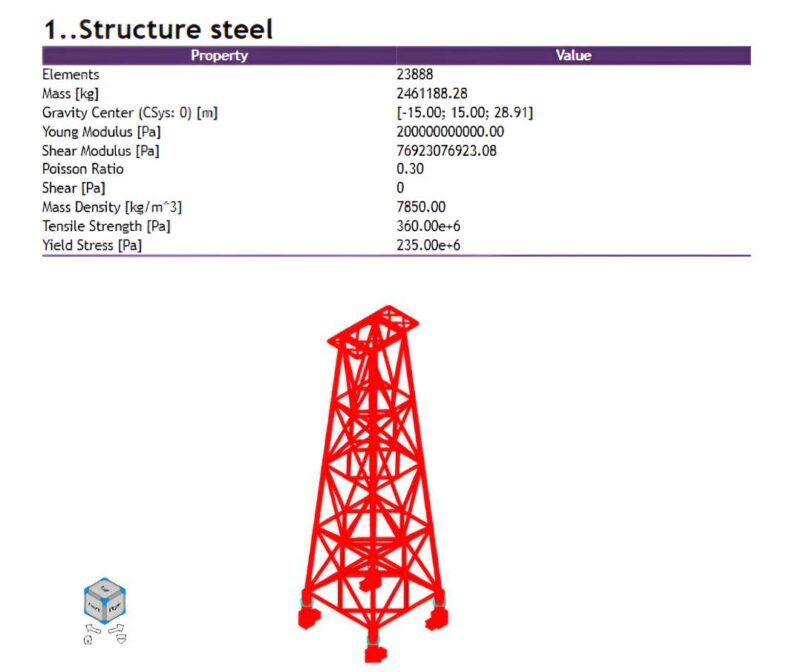
Jacket FEA model and structural steel properties used for the AS 4100 fatigue benchmark.
The model:
Base fixed at the shell edges.
Loads included gravity, concentrated loads at the top and bottom of the jacket, and wind pressure varying linearly with height, applied to the beams.
Several load cases were defined and combined into two load groups: one with wind and one without wind.
A fatigue group was created with 250,000 cycles for each load group (0.5 million cycles in total).
The governing detail was a fillet-welded plate (element 23475) in the base shell:
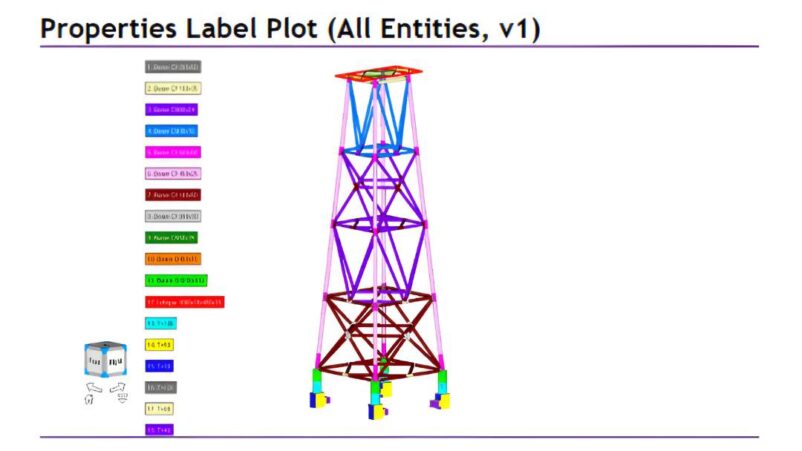
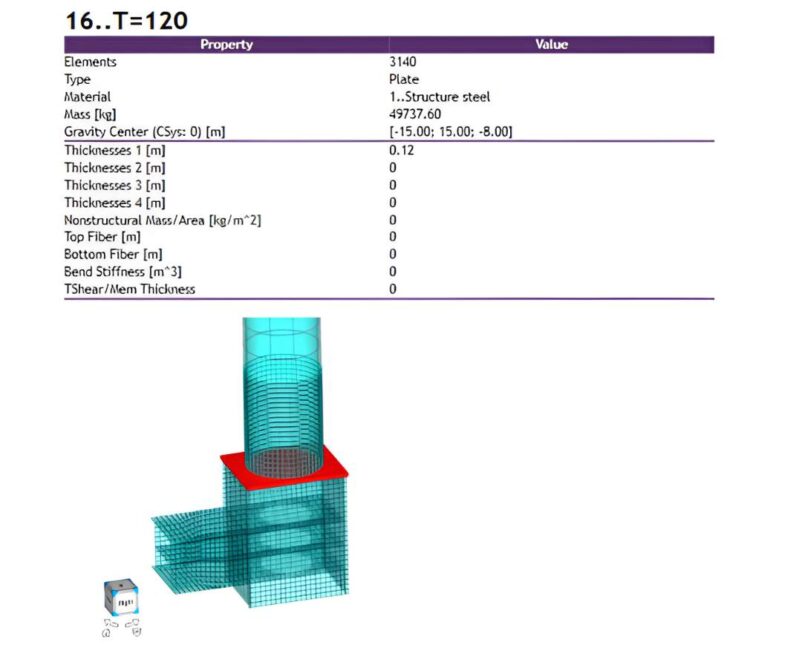
Properties label plot: beam sections and plate thicknesses in the jacket model, including the thick base plates where the governing weld is located.
Governing fillet-welded base plate (T = 120 mm) selected for hand calculations and AS 4100 fatigue verification in SDC Verifier.
Steel with E = 200 GPa, Poisson’s ratio 0.3, yield stress 235 MPa.
Detail categories chosen according to Table 11.5.1:
90 for normal stress,
80 for shear stress.
Capacity factor φ = 0.7.
Thickness correction factor βtf computed from Section 11 / 11.1.6, giving approximately 0.676.
A manual calculation was carried out following Section 11 step by step:
Basic applicability checks (t ≥ 3 mm, fy ≤ 690 MPa) were satisfied.
Maximum stress magnitude and stress range were both below the limits fy and 1.5 fy, respectively.
Exceptions from Sections 11 / 11.4 and 11.7 were evaluated with the actual stress range and cycle count and were found not applicable for this detail, meaning a full fatigue assessment was required.
Using the S–N parameters for category 90 (normal) and 80 (shear), adjusted by βtf and φ, allowable numbers of cycles were computed for the stress ranges from each load group.
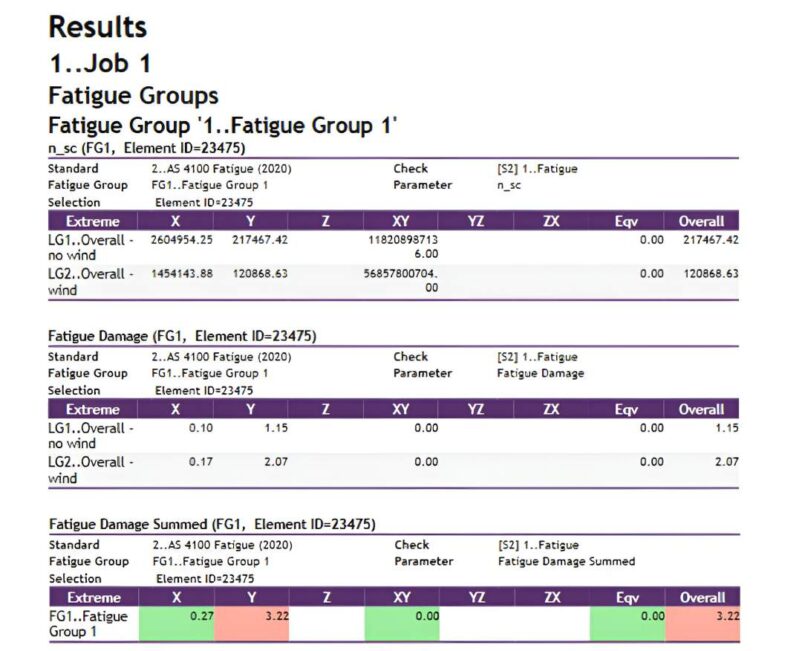
For normal stresses, the resulting allowable cycles were about 217,619 for the “no wind” group and 120,953 for the “wind” group. Shear stress led to much higher allowable cycles and was therefore non-governing.
Fatigue damage from each group was calculated as nsc / nallowed, giving approximately 1.15 for “no wind” and 2.07 for “wind”, and a summed damage of about 3.22. The weld therefore failed the fatigue check.
AS 4100 fatigue results in SDC Verifier for the governing plate: required cycles and fatigue damage per load group and total summed damage D≈3.22D ≈ 3.22D≈3.22, matching the hand calculation.
The same detail and load setup were then checked in SDC Verifier with AS 4100 Fatigue (2020) using the options described above. The software reproduced the hand calculation route: required cycles, damage per group, and total damage matched the manual values to engineering accuracy.
The benchmark confirms that the implementation in SDC Verifier follows the same clauses and equations as a hand design under AS 4100:2020. The difference is that the software applies this route to all relevant details, not just one weld that you have time to analyse in a spreadsheet.
Interpreting and Using the Results
The AS 4100 fatigue check in SDC Verifier produces, for each assessed detail or element:
the applied detail category, thickness, weld type, and capacity factor,
the greatest stress range in normal and shear direction,
indications whether the basic requirements (thickness, fy, stress limits) are satisfied,
indications whether an exception from Sections 11 / 11.4 or 11.7 applies,
allowable numbers of cycles in each direction,
fatigue damage per load group and total summed damage,
and, when rainflow is used, the same information based on rainflow-derived cycles and stress ranges.
A practical way to use these results is:
Filter for details where the basic requirements or limitations are not met; these might require a different approach or reformulation of the design.
Among the remaining details, sort by total fatigue damage and review those with the highest FdSummed.
For any detail with FdSummed close to or above 1.0, check:
whether the chosen detail category really matches the physical detail,
whether thickness and weld type are set correctly,
whether the Multiplying Factor is appropriate for the truss connection (if applicable),
whether φ correctly reflects redundancy,
and whether nominal stress is appropriate, or hot spot stress should be used instead.
Once you are satisfied with those inputs, the fatigue damage values can be used as part of your overall verification – alongside strength, serviceability, and stability – to judge whether the structure is acceptable for the intended number of load cycles.
Replace Manual AS 4100 Fatigue Checks
SDC Verifier automates AS 4100:2020 fatigue for jackets, bridges, frames and trusses — detail categories, βᵗᶠ, φ, rainflow and damage summation included. Download the software and validate it against your current spreadsheets.