In many engineering projects, reviews are delayed not because the analysis is wrong, but because the results cannot be fully trusted. Reviewers typically encounter reports where results are difficult to reproduce, the governing load case is unclear, units or software versions are missing, or large reports — often shared via a link — contain hundreds of pages of plots with little engineering narrative. In structural engineering, reporting is not merely an administrative step; it is a critical part of the verification process.
Where the Report Fits in the Verification Workflow
Engineering projects follow a structured, multi-stage workflow designed to ensure technical correctness, regulatory compliance, and, ultimately, value for the client. While the process may vary by discipline or project complexity, the core steps remain largely consistent.
Image: Engineering workflow diagram
Define approach – select calculation method, tools, and applicable standards.
Run analyses – load cases, combinations, and required analysis types.
Verify against codes – assumptions, checks, acceptance criteria.
Post-process results – identify governing cases and validate physical behavior.
Report – document assumptions, methods, results, versions, and conclusions.
Decide next steps – accept, revise, or iterate the design.
Delivering Value Through Clear Documentation
Clear documentation is essential, and there are specific, practical reasons behind it.
Traceability
Details are lost over time Without proper documentation, technical details are forgotten. Even after a short period, engineers may no longer remember assumptions, decisions, or intermediate steps.
The report as the final deliverable In many projects, the report is the only deliverable the client receives at the end. Without sufficient documentation, the client cannot see what was actually done.
Visibility of engineering effort Clients are often unaware of the effort invested in calculations, simulations, and additional analyses. If this effort is not reflected in the report, its value remains invisible.
Transparency of decisions and recommendations It is not enough to provide recommendations. The background, decisions, and reasoning behind them must be visible and verifiable.
Reporting as a value-adding activity Reporting sits at the center of the process and adds value. Time spent on documentation is unavoidable and inevitable.
Reviewability
Certification and regulatory requirements When certification bodies are involved, detailed documentation is essential. Every step must be outlined clearly to prove compliance with specific rules.
Meeting client standards and expectations When clients expect results that meet certain standards, reporting becomes inevitable and mandatory.
Answering fundamental questions Documentation must make it clear:
Whether the results satisfy the initial request
Where this can be seen
Whether the project goals were achieved
How the solution was developed
Not only for third parties Documentation is not only required for certification organizations; it is also essential for internal quality assurance within the company.
Support for QA and quality control If work is reviewed by QA or quality control, documented details are necessary to verify calculations and conclusions.
Reusability
Long-term project revisitability If a client needs to revisit a project after five or ten years to recheck certain aspects, this is only possible when the work has been documented properly.
Engineer’s ability to return to the work If the engineer needs to verify something years later, this is extremely difficult without documentation. Finding the latest model among dozens of iterations or remembering technical details is unrealistic.
Applicability to simple tasks Even simple tasks require gathering details, following checklists, and documenting assumptions. This is also a form of reporting.
Support for self-verification Proper documentation helps engineers double-check their own work later.
Image: Value for the client cycle
Ways to Share and Present Information
Time spent on presenting and sharing engineering results is inevitable. There are several common ways to deliver information, each with clear limitations and implications.
Primary Component of a Complete Engineering Report
A complete engineering report must clearly show what was done, how it was done, and why it was done. The following components are essential to make a report complete, transparent, and understandable.
Image: Table of components of engineering report
Company’s Information
Information about the company
Details about the engineer who prepared the report, so responsibility is clear
Information about the client
List of files used for the report
Cross-references, logos, and basic visual elements to ensure clarity and consistency
Introduction
Background and context of the project
Clear explanation of what the report is about
The client’s request and the goal of the work
Scope of work and steps required to reach the final outcome
References to other documents and standards used
Full FEM Model Description
Complete description of the model used
Background information explaining how the model was created
Masses, materials, shapes, plate thicknesses, and relevant characteristics
Loads and boundary conditions
Overall model setup, including load factors
Purpose: to avoid treating the model and results as a “black box”
Calculation Setup
Description of the calculation setup
Assumptions made during the analysis
Checks conducted
Types of analyses used
Verification Description
Description of verification checks performed
Explanation of whether lifetime estimation, strength checks, buckling checks, or other verifications were carried out
Clear explanation of how these checks were conducted
When Standards Are Used
Identification of applicable industry standards
Explanation of assumptions required by the standards
Input parameters used
Output parameters obtained
Clarification of compliance with prescribed rules
Results Overview
Presentation of results using:
Plots
Tables
Graphs
Animations (where applicable)
Clear and structured presentation without omitting relevant information
Explanation of the Results
Explanation of what the results mean
Clarification of why certain behaviors or outcomes appear
Adaptation of explanations for readers without a strong technical background
Summary
Short summary of the entire work
Overview of what was requested and what was done
High-level recap for readers who do not need full technical detail
Conclusion
Clear and concise conclusion
Statement on whether the original goal was achieved
Confirmation that the results answer the initial practical question
Final connection between calculations performed and value delivered
A report structured in this way ensures that complex engineering work is transparent, verifiable, and focused on delivering value rather than performing calculations without purpose.
What Reviewers Check in the First 5 Minutes
The main points reviewers look for during the first few minutes are a concise summary and check results.
Results must include all data from governing load cases, including all checks; for example, beam member check, buckling check, etc., maximum utilizations, and a clear pass/fail statement against the applicable code. They check whether assumptions, boundary conditions, and safety factors are stated explicitly and whether results are traceable to the model and standard used.
If these elements are missing, confidence in the analysis drops. A well-structured report makes the critical answers visible upfront: what was checked, what governs, and whether the structure complies.
Types of Engineering Reports
There are several types of engineering reports, each differing in how the content is created andmaintained. The main approaches are hand-made reports, fully automated reports, and hybrid reports.
Image: Types of reports
1. Hand-Made Report
A hand-made report is created entirely manually:
It is unique and highly customized
Considerable effort is invested in writing and explaining content
The final result often looks polished and tailored
However, this approach has major drawbacks:
It requires a lot of time
Given the number of important report components, manual preparation takes ages
Any change in geometry, loads, boundary conditions, or calculations requires the entire report to be redone
Updates must be performed manually, which is impractical
This creates a high risk to project success, as delays prevent timely value delivery
If value is not delivered on time, the project cannot be considered successful.
2. Fully Automated Report
A fully automated report is generated directly from calculations and models like in FEA report generator:
It may lack some of the uniqueness of a hand-made report
Additional effort may be needed to improve customization
Despite this, it provides major advantages:
Saves an much time
Reports can be easily regenerated when changes occur
Eliminates the high risk associated with manual rework
Allows engineers to focus on real engineering tasks and value creation
Avoids repetitive work such as copying, pasting, and rewriting content
This approach supports efficiency and consistency while maintaining project reliability.
3. Hybrid Report
A hybrid report combines both approaches:
Routine elements, such as FEM model descriptions and results presentation, can be automated
Selected sections, such as summaries or conclusions, can be written manually
Offers a balance between customization and efficiency
Saves a significant amount of time while preserving flexibility
This combination allows engineers to automate repetitive parts while dedicating effort to areas where manual input adds the most value.
This article is based on SDC Verifier’s webinar “Automating Structural Engineering Reports”: https://youtu.be/0lSV_EJaE-A?si=2Q4ED8LJRdMMdlVh
The Automation Solution: How SDC Verifier Transforms Reporting
Image: SDC Verifier’s reports
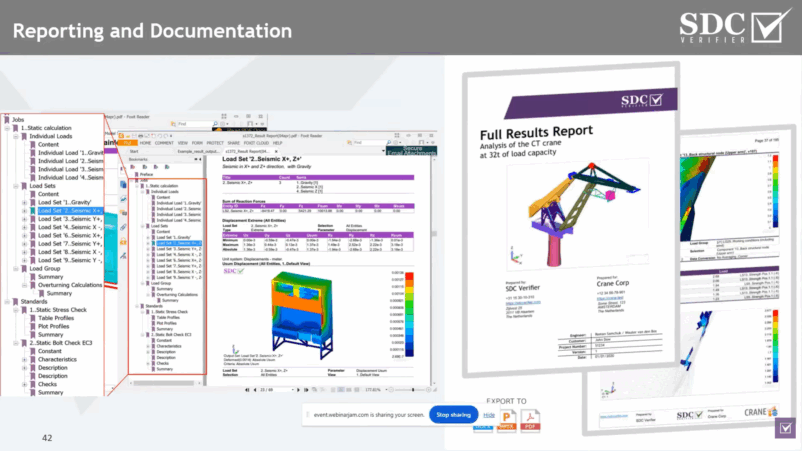
In SDC Verifier, reporting is part of the workflow: you can generate model documentation, verification results, and reviewer-ready summaries in Report Designer.
Report Types Available in SDC Verifier
SDC Verifier supports several report formats available in Report Designer tool:
Report from scratch: created from a blank page using drag-and-drop elements.
Model setup report: automatically includes a full model description to save time.
Results report: focuses on a complete results overview with plots and tables.
Full report: combines model setup and results in a single document.
PowerPoint report: use PPT when you need an executive overview; keep full traceability in Word/PDF.
Customizable Report Layout
Report layout customization is supported to meet internal company requirements:
Adjustable page layout, row height, and width
Custom fonts, headers, and footers
Layout settings aligned with company rules and procedures
Report Designer and Interface
All report types are accessed through the report designer:
Different report types are available from the interface
Reports are built using tabs that represent different steps and features
Word, PDF, and PowerPoint export options are available
Unit systems, number formats, views, and components can be predefined
First Page, Preface, and Table of Contents
Key structural elements are automated and customizable:
First page includes engineer details, company, client, project number, and logos
Information is stored in a library and reused automatically
Preface contains critical metadata such as:
Unit system
Software version
Model and project file paths
Generation date
This information supports traceability and future reference
A table of contents is generated automatically
Automated Model Information and Setup
SDC Verifier automatically generates detailed model documentation:
Global model information such as weight, center of gravity, and global dimensions
Full summaries of materials, properties, loads, and boundary conditions
Welds, plates, beams, joints, solids, and other recognized structural items are documented automatically
Standards and Appendices
Automatic appendices with full descriptions of applied standards
Clear indication of what parts of the standards were used
Reference to categories such as fatigue notch classes
Full traceability of standard-based assumptions and parameters
Results and Verification Reporting
Results are structured and automated:
Tables, plots, diagrams, histograms, and graphs
Stress results, check results, and critical regions
Identification of governing load combinations
Percentage influence of different loads on results
Support for fatigue results, diagrams, and check histories
Results can be organized by structural parts or selections
Step-by-Step Guide on the Report Designer in SDC Verifier
The process begins with selecting a starting point from several available options, including empty templates, model setup, or a full template. TheReport Designerwindow acts as a central hub where users can integrate model data, analysis results, and various post-processing tools.
Image: SDC Verifier interface, choosing report type
Modular Content Generation
One of the primary ways to optimize the process is to avoid generating the entire report at once. SDC Verifier allows users to generate items individually. For example, the first page can be customized with specific customer information and a chosen model view; once edited, a simple right-click allows the user to generate only that specific section to verify its appearance.
3 time-saving rules
Generate sections one-by-one (validate as you go)
Copy/paste templates across load groups (auto-updates load set)
Use selections + import plots (avoid rework)
Image: The first page of SDC Verifier’s report
Importing Pre-existing Plots
To further save time, users do not need to recreate visualizations from scratch. The import tab allows for the direct integration of plots and job results that were previously created in the main SDC window. Once imported, these items appear in the report tree and can be further adjusted regarding their position, description, or selection.
Image: Imported data in the report
Efficient Content Management and Duplication
Efficiency in SDC Verifier is largely driven by the ability to create a component once and reuse it across multiple sections of the report.
Leveraging Copy-Paste Functionality
Result templates, tables, and views can be prepared for a single load condition and then copied to other chapters using standard shortcuts like Control+C and Control+V. A major advantage of this system is that when a plot is pasted into a different load combination or group, the load set is automatically updated to reflect the new context, requiring only a final “generate” command to complete the update.
What changes / what doesn’t: The view/template stays the same; the load set updates to the target chapter. You still click Generate to refresh.
Image: Example of report from SDC Verifier with all data
Refining Selections and Categories
The software provides granular control over what each view represents. Users can edit a copied view to change the data category — for example, switching from displacement to stresses. Furthermore, the “selection” tool allows users to filter the view so it only displays specific parts of the model, such as individual plates or specific properties, rather than the entire structure.
Finalizing and Exporting the Report
Once the content is organized, the right-hand side window provides final adjustment options for table descriptions and viewing angles.
Reports are rarely final on the first try — revisions are a normal part of the process. After recalculation, regenerate the affected sections, update the revision number and date, and keep a simple change log to track modifications. This ensures that all updates are clearly documented and traceable for reviewers and stakeholders.
Export Formats
Completed reports can be exported directly to Word or PDF via the top ribbon of the designer. This allows for easy sharing and further manual formatting if required by the client or project standards.
Image: Export to Word format option
Saving and Regeneration Settings
When closing the report, SDC Verifier provides a “save and generate content” check button.
Tip: Selecting this option is a critical optimization step, as it ensures that plots will not need to be regenerated when the report is reopened, significantly reducing loading times for future sessions.
High-quality engineering reports follow a minimal, reusable structure that engineers can apply across projects: define assumptions and inputs, build the model, run analyses, verify against codes, post-process results, and document findings. Reports should also address the reviewer’s checklist by clearly showing governing cases, summaries, units, versions, and traceable decisions.
Using automation shortcuts from SDC Verifier, such as copying templates across load groups and regenerating sections after recalculation, helps reduce repetitive work while maintaining accuracy and consistency. With these practices, reports remain comprehensive, traceable, and review-ready, supporting both project compliance and long-term revisitability.